Become a master of the famous Angular error: "Can't bind to x since it isn't a known property of y"
Admittedly, the most common and yet most confusing Angular error for a beginner is the dreaded error that reads like this:
Can’t bind to x since it isn’t a known property of y
Where x is typically a directive you’re trying to use, such as ngModel for example, and y is the name of the HTML tag in which the directive x is in.
Let’s walk through a concrete scenario.
Can’t bind to ‘ngModel’ since it isn’t a known property of ‘input’.
This error is guaranteed to happen when two pieces of code combine:
- A component declares a property.
- The same component’s template attempts to do two-way binding (think “banana in a box” syntax) to a property using the
ngModeldirective. - The module where the component throwing the error is declared does not import the
FormsModuleexplicitly or implicitly.
Here is a quick rundown of what the code might look like for each of the above code conditions:
A component declares a property
This one is simple:
| |
In this most simple component, line 8 declares a property name textBox with no initial value.
Using a directive
In the template for the above component (app.component.html), then we need to attempt to use the ngModel directive like this:
<input [(ngModel)]="textBox" />
Missing the directive’s module
And finally, in the module where AppComponent is declared, we completely miss importing the FormsModule directly or indirectly. See line 7 below:
| |
Tips and tricks to find the missing module and where to put it
You might have come here looking for help, but your directive having trouble is something else and might be wondering “ok, what now?".
Here I will share with you what I do when I’m faced with this error, no matter what the directive (or x) is.
Step #1: Find out which module is the directive a part of
The first thing we ought to do is figure out in which module is the missing directive. The simplest way I’ve found so far is to search for “angular x module”, where x is the name of the directive causing the trouble.
If ngModel were the offending directive, searching for “angular ngModel module” would find me a few links. The first one should be a link to the official Angular API documentation site: https://angular.io/api/forms/NgModel. On this page, you can quickly find the module this directive is a part of. If it’s already too late for you and your tiredness doesn’t let you see it right away, it would look like this:
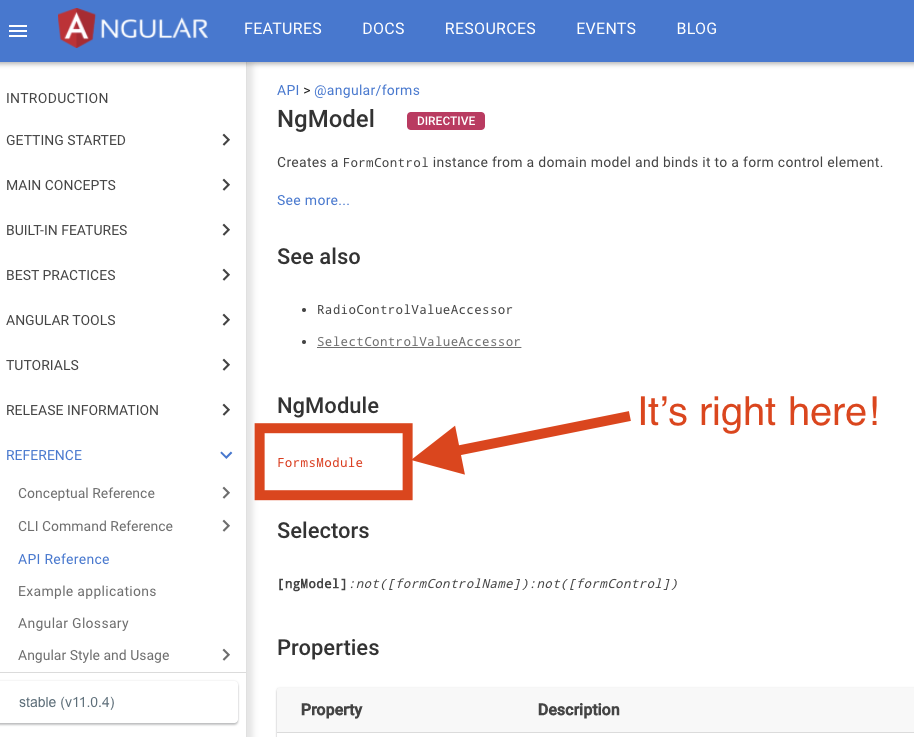
This can be applied to all sorts of directives. For example, try searching the module for routerLink or mat-input and you will see similar results.
Once the module is figured out, you’re ready to move to step #2.
Step #2: Find in which module you need to import the missing module
I’m not sure why, but every time a student of Angular hears about modules their brains shut. In a simple app where only one app module is used, this would be easy. But what about a more robust app that has so many modules that it’s easy to miss the tree for the forest?
In the simplest terms, an Angular component will always need to be included in the declarations array of a module. Without this, you wouldn’t even be able to use the component and would be facing a different error. So what you will need to do is to find the module where the component in question is declared. The easiest way for me to do that is to open up the “Find in Path” dialog box in Webstorm (or the Search tab in VS Code) and type the name of the component I’m looking for. Then in the matches area, find where it’s referenced in the declarations array. You should be able to find it referenced in the declarations array from only one file (otherwise, you would see a different error).
Once you find that module, make sure the module you need to import is already imported or is imported by another module already. Most likely it is missing and that’s why it’s giving you this error but it’s always a good idea to double-check. Add the missing module to the imports array and give it a try.
Did it fix that problem? I sure hope so!